Hi, we have new release information for P2A Nav.
This is a significant release with a number of features moving from beta to full release. The features are focused on the Analyze, Prioritize, Plan, and Act phases of continuous improvement. Results and Business Outcome improvement come through understanding where you are (Assess) and taking action to get to where you need to be. These enhancements reinforce and simplify achieving successful results.
Here's what we're releasing:
New Features
Redesigned Map Interface
The Path to Agility Map has been redesigned to improve the layout and support better user engagement. The improvements are:
- The business outcome listing expands or collapses for simpler interaction
- The score color scale key has moved to the top of the page for better visibility
- The toggles which control how the map renders and data it displays were moved from the side to the top to make them easier to see and interact with
- A new toggle was created to turn on/off the dependency lines between Agile Outcomes
 Image. Redesigned Map with improved support for business outcomes and toggles to control the interactive map elements.
Business Outcome Prioritization
The new Business Outcome prioritization section can be found under the Organization section by navigating to Assess > Business Outcomes. Users are able to select their organization, system, or team and set priorities. For systems and teams, Business Outcomes can be set manually. For organizations, they can be set via a poll or manually.
 Image. Business Outcome prioritization support.
One other note on business outcome prioritization. The platform supports cascading the prioritization of business outcomes from either the organization (down to all systems/teams) or from systems (down to all its teams). This provides better visibility across all levels.
Improved Support for Capability Prioritization
Continuing with the prioritization theme, the application now supports persisting priorities to add clarity and track progress against them. There are now two areas to visualize priorities. Under the Analyze menu, there is the Capability Priorities page which provides visualization support for viewing priorities across an entire level (i.e. all systems, all teams) or for a specific business unit (the organization, a system, or a team). In addition, we've enhanced the P2A Index algorithm, which assigns a number ranking to each capability to identify the highest value capabilities for improving. The algorithm now supports more than one prioritized business outcome.
 Image. Capability Priorities page where analysis can be performed, leveraging the updated P2A Index to identify opportunities for improvement.
The capability prioritization section, accessed from the Prioritize > Prioritization menu item, clearly identifies which business units have prioritized capabilities and which don't. It allows capabilities to be set, edited, and viewed across the entire organization.
 Image. Prioritize Capabilities page which supports setting, editing, and viewing prioritized capabilities for all business units in an organization.
Enhanced Side Panel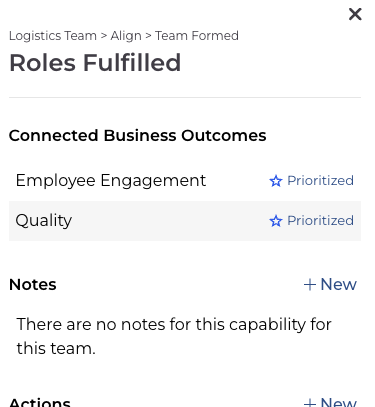
The side panel is the window that opens on the right side of the screen when an Agile Outcome or Capability is selected. The side panel includes valuable information about each entity. With this overhaul, now both Agile Outcomes and Capabilities include a section identifying the Business Outcomes they're connected to.
Features Summary:
- The Path to Agility Map has been redesigned
- Business Outcome prioritization and the corresponding poll have been elevated from a button on the Map to it's own section in the application
- Prioritization of Business Outcomes is now supported at all levels (organization, system, and team)
- Prioritized Business Outcomes are now persistent, meaning, once prioritized, they are visible throughout the application
- Unique icons for each Business Outcome are being introduced
- The prioritization of capabilities for all levels (organization, system, and team) is now fully supported
- The side panel (window opening on the right side of the screen when an Agile Outcome or Capability is selected) has been enhanced with a redesign and support for prioritization improvements
As always, contact us either by clicking the Contact Support button in the top navigation of Navigator or by writing to us at support@pathtoagility.com. Thank you for being a Path to Agility Navigator user!
